Sell tickets online for your event

Event page, ticket configuration, sales launch. Your attendees pay by card, Apple Pay, Google Pay or Bancontact and receive their ticket by email and in their Wallet.

Your sales page and tickets

Set up your event and open sales

Each event has its own page with title, description, visuals, venue and dates. Responsive on all screens. Shareable on your social media or embeddable on your website. Create from scratch or duplicate an existing event.

Customisation and advanced options

Custom tickets, promo codes, bespoke fields.

After each purchase, your attendees automatically receive their confirmation and tickets (PDF & Apple/Google Wallet). Customise the design with your visuals, colours and practical info. Each ticket contains a unique QR code, ready for scanning on the day.

Sell your seats on a seating plan

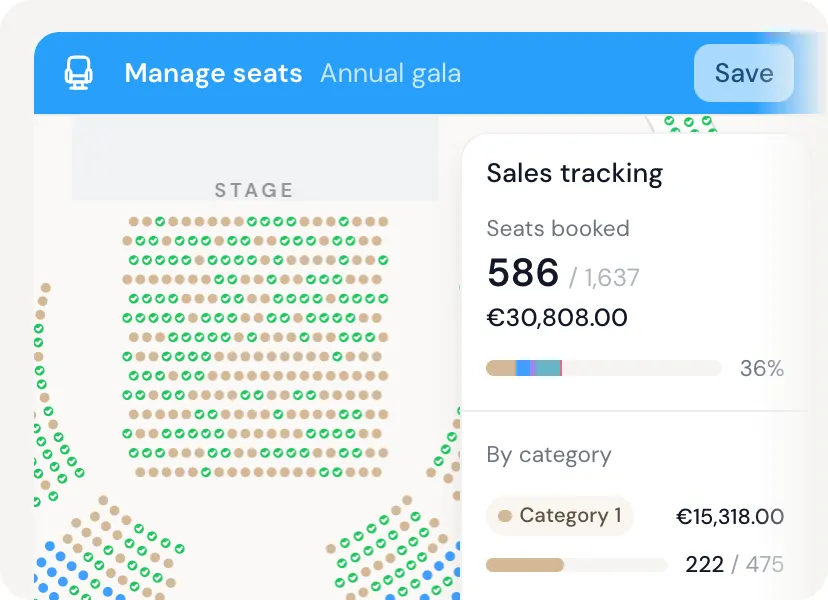
Your audience picks their seat on your venue’s plan, each zone at its own price.

Each zone has its colour and prices, each seat its price: full, reduced, child. Wheelchair spaces and seats held for your guests included.

PassPass seating plan: sold seats ticked in green and sales tracking by category

Everything you need for your event.

  • Event creation
  • Multi-tickets
  • Early bird
  • Promo codes
  • Add-on products
  • Custom fields
  • QR code scan
  • Mobile app
  • Offline mode
  • Dashboard
  • Team management
  • CSV/Excel export
  • Automated emails
  • Peppol invoices
  • Stripe payments
  • Multi-language
  • Customisation
  • Public page
  • Statistics
  • Human support
  • Badge printing

A fully operational ticketing system in a few clicks. Create your event and sell your first tickets in minutes, with no commitment.

  1. Step 1

    Create your event

    Name, date, venue and visual: your sales page is ready in minutes, in your colours.

  2. Step 2

    Add your tickets

    Prices, quantities, early bird, promo codes and add-ons. You choose who pays the fees.

  3. Step 3

    Share or embed

    Send the link by email and on social media, or embed the ticketing on your website.

  4. Step 4

    Scan at the entrance

    On the day, scan tickets with the PassPass app on any smartphone and follow entries live.

Mailchimp
Brevo
Hubspot
Zapier
Attio
Make
Meta
Pipedrive

Connect your tools. PassPass integrates with your tools.

Frequently asked questions.

Ready to launch your event?

Create your free account in 30 seconds. No credit card, no commitment.